EPYC, RTX 5090 vs RTX 6000

Sharing some benchmarks of IQ5_K on EPYC 9355, various context sizes:
Single RTX 5090, 32K context (max to fit @ f16)
    ./llama-sweep-bench \
        --model "$MODEL_PATH" \
        --no-mmap \
        -b 4096 -ub 4096 \
        -ctk f16 -ctv f16 -c 32768 \
        -ngl 999 -ncmoe 999 \
        --grouped-expert-routing \
        --merge-qkv \
        --threads 24 \
        --threads-batch 32 \
        --warmup-batch \
        -n 256
| PP | TG | N_KV | T_PP s | S_PP t/s | T_TG s | S_TG t/s |
|---|---|---|---|---|---|---|
| 4096 | 256 | 0 | 8.678 | 471.99 | 12.459 | 20.55 |
| 4096 | 256 | 4096 | 9.077 | 451.26 | 12.866 | 19.90 |
| 4096 | 256 | 8192 | 9.423 | 434.69 | 13.107 | 19.53 |
| 4096 | 256 | 12288 | 9.790 | 418.38 | 13.481 | 18.99 |
| 4096 | 256 | 16384 | 10.121 | 404.69 | 14.077 | 18.19 |
| 4096 | 256 | 20480 | 10.396 | 393.99 | 14.084 | 18.18 |
| 4096 | 256 | 24576 | 10.858 | 377.25 | 14.613 | 17.52 |
| 4096 | 256 | 28672 | 11.392 | 359.55 | 14.764 | 17.34 |
Single RTX 5090, 64K context (max to fit @ q8_0)
    ./llama-sweep-bench \
        --model "$MODEL_PATH" \
        --no-mmap \
        -b 1024 -ub 1024 \
        -ctk q8_0 -ctv q8_0 -c 65536 \
        -ngl 999 -ncmoe 999 \
        --grouped-expert-routing \
        --merge-qkv \
        --threads 24 \
        --threads-batch 32 \
        --warmup-batch \
        -n 256
| PP | TG | N_KV | T_PP s | S_PP t/s | T_TG s | S_TG t/s |
|---|---|---|---|---|---|---|
| 1024 | 256 | 0 | 6.536 | 156.67 | 12.658 | 20.22 |
| 1024 | 256 | 8192 | 6.633 | 154.38 | 13.775 | 18.58 |
| 1024 | 256 | 16384 | 6.845 | 149.61 | 14.822 | 17.27 |
| 1024 | 256 | 24576 | 7.000 | 146.29 | 16.269 | 15.74 |
| 1024 | 256 | 32768 | 6.948 | 147.39 | 17.989 | 14.23 |
| 1024 | 256 | 40960 | 7.314 | 140.01 | 19.740 | 12.97 |
| 1024 | 256 | 49152 | 7.642 | 134.00 | 21.392 | 11.97 |
| 1024 | 256 | 57344 | 8.001 | 127.98 | 22.845 | 11.21 |
| 1024 | 256 | 64512 | 8.139 | 125.81 | 25.354 | 10.10 |
Single RTX 6000, 192K context (max supported)
    ./llama-sweep-bench \
        --model "$MODEL_PATH" \
        --no-mmap \
        -b 8192 -ub 8192 \
        -ctk f16 -ctv f16 -c 196608 \
        -ngl 999 -ncmoe 999 \
        --grouped-expert-routing \
        --merge-qkv \
        --threads 24 \
        --threads-batch 32 \
        --warmup-batch \
        -n 256
| PP | TG | N_KV | T_PP s | S_PP t/s | T_TG s | S_TG t/s |
|---|---|---|---|---|---|---|
| 8192 | 256 | 0 | 11.294 | 725.34 | 12.656 | 20.23 |
| 8192 | 256 | 16384 | 13.643 | 600.43 | 14.151 | 18.09 |
| 8192 | 256 | 32768 | 16.848 | 486.22 | 15.492 | 16.53 |
| 8192 | 256 | 49152 | 21.804 | 375.71 | 17.151 | 14.93 |
| 8192 | 256 | 65536 | 26.748 | 306.27 | 18.837 | 13.59 |
| 8192 | 256 | 81920 | 31.093 | 263.47 | 26.243 | 9.75 |
| 8192 | 256 | 98304 | 35.944 | 227.91 | 31.187 | 8.21 |
| 8192 | 256 | 114688 | 40.928 | 200.15 | 33.786 | 7.58 |
| 8192 | 256 | 131072 | 45.776 | 178.96 | 36.925 | 6.93 |
| 8192 | 256 | 147456 | 49.368 | 165.94 | 39.823 | 6.43 |
| 8192 | 256 | 163840 | 54.102 | 151.42 | 42.650 | 6.00 |
| 8192 | 256 | 180224 | 58.958 | 138.95 | 45.294 | 5.65 |
This is running in a VM, with GPUs and CPU power-limited, so better results are achievable on the same hardware.
The significant drop in speed around 82K is interesting. At 128K it is twice as slow (or half the speed) of Kimi-K2.
But honestly, I haven't seen a model yet working well with context sizes above 64K or so, so it doesn't matter much 😀.
Thank you for the quants @ubergarm .
Thanks for the benchmarks here on the new GLM-4.7 comparing with Kimi-K2-Thinking over here: https://huggingface.co/ubergarm/Kimi-K2-Thinking-GGUF/discussions/5
I didn't graph the comparisons which would be easier to read the tea leaves, but seems like Kimi-K2-Thinking as faster TG as context depth gets deeper. Pretty interesting as Kimi is a 1000B model vs the GLM's 358B! Maybe has something to do with MLA style attention on Kimi?
A few thoughts about your comments over there:
Kimi-K2 Thinking Q4_X with max supported context on RTX PRO 6000. It only fills 50% of VRAM (47 GB), while GLM 4.7 IQ5_K takes it all.
Yeah the MLA is much more efficient on VRAM storing long context is my guess. If you don't need all that extra context length, offloading more routed experts into VRAM will likely boost your speed making Kimi even faster at TG relatively. (My modelcard for GLM-4.7 has some newer examples)
This is without --grouped-expert-routing --merge-qkv, which I'm not quite sure what they are about:
I believe the -ger grouped expert routing is not for all models, but does work with GLM and can give a small improvement. Similarly when using a single GPU you can get like 1-2% speed-up also with --merge-qkv as these are small fusions of kernels reducing overhead is my understanding.
It has been tricky to keep up with all of ik's hard work lately haha... Especially if you have 2x GPUs and NCCL installed you can get some great improvments with -sm graph becoming competitive with VLLM in my early impressions at least at single user generations. Doesn't help tho for 1x GPU as that is already optimized.
The significant drop in speed around 82K is interesting.
Yeah wonder what that is about, perhaps some kind of power limiting kicking in or temperature throttling or something happening ? Have you checked out LACT for undervolting your GPUs instead of simple power limiting? Ends up giving roughly same performance at like lower power usage too! (holler if you need a link about LACT or i have some discusson of it in my recent talk here with timestamp listed in text: https://blog.aifoundry.org/p/adventures-in-model-quantization
Cheers and happy new years!
Thank you for your insights, @ubergarm .
Yeah wonder what that is about, perhaps some kind of power limiting kicking in or temperature throttling or something happening ?
That was my first thought too — I do have fairly aggressive throttling configured when RAM temps get too high. So I monitored temps and re-ran the bench three times, and it doesn’t seem to be the culprit.
Have you checked out LACT for undervolting your GPUs instead of simple power limiting? Ends up giving roughly same performance at like lower power usage too! (holler if you need a link about LACT or i have some discusson of it in my recent talk here with timestamp listed in text: https://blog.aifoundry.org/p/adventures-in-model-quantization
Not yet — I’ve been a bit scared to touch undervolting 😅. But it’s on my "TODO (eventually)" list. Thanks for the link — I’ll watch it now!
Cheers and happy new years!
You too! And thank you for your work.
Here is Q8_0 for comparison. It is significantly slower at lower context, but the difference is marginal later. It doesn't fit 192K at -ub 8192 -ctk f16 to 96 GB tho:
| PP | TG | N_KV | T_PP s | S_PP t/s | T_TG s | S_TG t/s |
|---|---|---|---|---|---|---|
| 8192 | 256 | 0 | 13.499 | 606.85 | 15.182 | 16.86 |
| 8192 | 256 | 16384 | 15.628 | 524.18 | 16.611 | 15.41 |
| 8192 | 256 | 32768 | 18.561 | 441.36 | 18.094 | 14.15 |
| 8192 | 256 | 49152 | 23.677 | 345.99 | 19.716 | 12.98 |
| 8192 | 256 | 65536 | 28.509 | 287.34 | 21.286 | 12.03 |
| 8192 | 256 | 81920 | 32.778 | 249.92 | 29.586 | 8.65 |
| 8192 | 256 | 98304 | 37.355 | 219.30 | 33.977 | 7.53 |
| 8192 | 256 | 114688 | 42.326 | 193.55 | 39.272 | 6.52 |

Ah, this is tempting me to run GLM 4.7 on the RTX 5090 and see how it hangs. I've been positive with MiniMax M2.1 since it's smaller and more generous on memory. Different fine tuner.
Have you checked out LACT for undervolting your GPUs instead of simple power limiting? Ends up giving roughly same performance at like lower power usage too! (holler if you need a link about LACT or i have some discusson of it in my recent talk here with timestamp listed in text: https://blog.aifoundry.org/p/adventures-in-model-quantization
I have LACT and afaik there's no direct undervolting capability on Linux as these been disabled on nvidia drivers for Blackwell. I was adamant getting it done.
Although, offsetting the core clock +50 and a touch lower power consumption (400w) substantially drops the temps, offsetting the small performance loss.
Works well on fully VRAM MoE models which virtually hits full core speed, whereas dense models will be visibly slower.
Is the temperature on RAM significant on offloaded models? Never checked their temps. Nuts.
Is the temperature on RAM significant on offloaded models? Never checked their temps. Nuts.
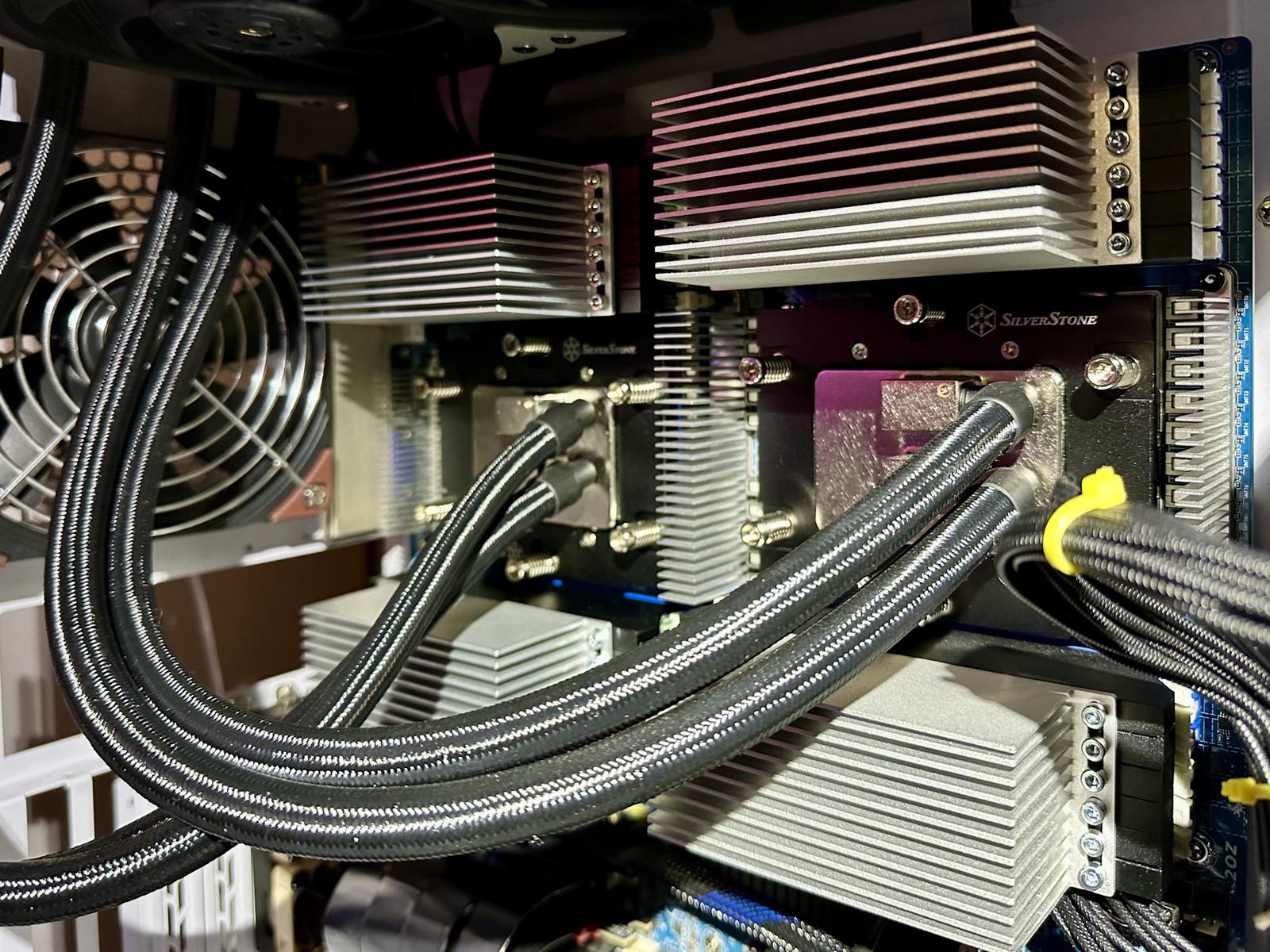
Yeah — it can be. Offloaded models put a lot of pressure on the memory subsystem. On my machine, I couldn’t finish a single sweep-bench run until I added a DRAM heatsink. Consumer DIMMs often ship with heatsinks these days, but server RAM typically doesn’t — presumably because it’s designed for chassis airflow with turbine-style fans.
Is the temperature on RAM significant on offloaded models? Never checked their temps. Nuts.
Yeah — it can be. Offloaded models put a lot of pressure on the memory subsystem. On my machine, I couldn’t finish a single
sweep-benchrun until I added a DRAM heatsink. Consumer DIMMs often ship with heatsinks these days, but server RAM typically doesn’t — presumably because it’s designed for chassis airflow with turbine-style fans.
Thanks for the heads-up. Big blind spot from my side. Might have been lucky since I always have the room cooler and has plenty of airflow kicking earlier.
Never seen any particular signs. What caused your bench not to finish? Locking up?
Mine don't have heatsinks. I suppose I need to stress test them and align myself to potentially get some.
It was a few months back, but I remember watching RAM temps climb to ~97°C, everything in red, and me not shutting it down… until the machine did it itself 🙂.
After booting again, one DRAM module didn’t show up. I shuffled the modules around the next day, pretty sure I had just lost a 64 GB stick and I just needed to figure out which one — but the machine eventually recognized all of them. And it actually recovered: I stress-tested it thoroughly afterwards.
That experience forced me to find the “memory frequency throttling” screen in BIOS and put sensible limits there. Once I did, every sweep-bench was crippled by throttling. The heatsinks I installed later fixed all of that.